Best robot vacuums
Quick answer
The dreame L40s Ultra (under $500) is the strongest overall pick: it pairs 19,000Pa suction with a self-emptying base, which most robots under $500 still skip. Budget shoppers should look at the iRobot Roomba 105 Vac (under $200) for straightforward lidar navigation, while anyone chasing the highest published suction figure in the catalog should look at the roborock Qrevo Edge 2 (over $1,000).

dreame L40s Ultra Robot Vacuum and Mop, 19,000Pa Suction & Auto Empty
The dreame L40s Ultra lists 19,000Pa of sealed suction, well above the 8,000 to 10,000Pa that most mid-priced robots publish, and it includes an auto-empty base so the bin does not need daily attention. At under $500 it sits in the upper-middle of the category instead of at either extreme, which is where the spec-for-dollar trade tends to be best.
The three tiers
Beginner: iRobot Roomba 105 Vac
A first robot vacuum for a single-level home with mostly hard floor and low-pile rug.
The Roomba 105 Vac uses lidar navigation to map a home and clean in rows rather than bouncing randomly, which is the single biggest jump in coverage quality over a random-path budget bot. iRobot lists it with power-lifting suction and self-charging return to dock. At under $200 it has no self-emptying base and no HEPA filter claim in the published listing, so the bin gets emptied by hand and dust escapes on emptying the way it does with most base-level robots.
Not for: Homes with thick carpet that needs strong agitation, or anyone who wants to skip emptying the bin for weeks at a time.
Intermediate: roborock Q7 M5+
A household that wants to stop touching the dustbin for weeks and also wants light mopping on hard floor.- Intermediate pick
roborock Q7 M5+ Robot Vacuum and Mop, Up to 7-9 Weeks Self-Empty, 10000Pa
Under $300 Check priceBudget band; Amazon shows the current price
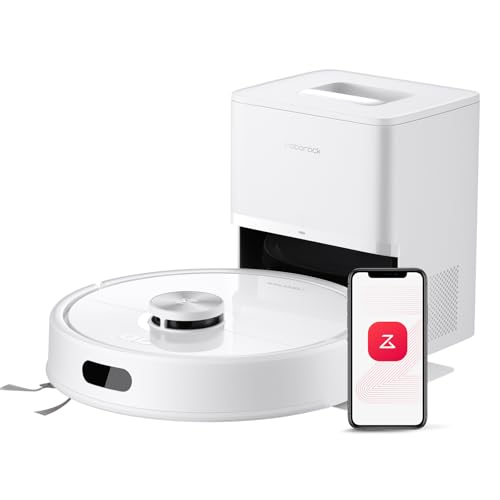
The Q7 M5+ combines 10,000Pa suction with a self-empty dock rated for 7 to 9 weeks between bag changes, and it uses lidar rather than camera-only navigation, which tends to hold up better in dim rooms. The 2.7 litre dock bag and vacuum-and-mop combo head cover both floor types without swapping accessories. At under $300 it is a genuine step up from the beginner tier for a little more than double the price.
Not for: Anyone who wants a mop function that can scrub dried, stuck-on spills, since robot mop pads work by light wiping, not scrubbing.
Expert: roborock Qrevo Edge 2
Buyers who want the single highest-suction, highest-spec robot in the catalog and are willing to pay flagship price for it.- Expert pick
roborock Qrevo Edge 2 Robot Vacuum and Mop, 25,000Pa, 3.14'' Ultra-Slim
Under $1,000 Check priceBudget band; Amazon shows the current price

The Qrevo Edge 2 lists 25,000Pa suction, the highest published figure in this roundup, in a 3.14 inch ultra-slim body designed to fit under low furniture that stops other robots. It uses lidar mapping. Notably, the published listing does not claim a self-emptying base, which is the trade-off for the slim profile: some ultra-thin flagships route the bin to reach that low height and skip the dock all the way down to size. At over $1,000 it is priced at the top of the category.
Not for: Anyone who wants a self-emptying base included in the box, or a buyer who has not confirmed under-furniture clearance is actually needed in their home before paying flagship price for it.
| Model | Budget | Suction | Self-empty | Lidar |
|---|---|---|---|---|
| iRobot Roomba 105 Vac | Under $200 | Not published | No | Yes |
| roborock Q7 M5+ | Under $300 | 10,000Pa | Yes (7-9 wks) | Yes |
| dreame L40s Ultra | Under $500 | 19,000Pa | Yes | Not published |
| roborock Qrevo Edge 2 | $1,000+ | 25,000Pa | No | Yes |
What Pascals actually measure on a robot vacuum
The Pa figure printed on a robot vacuum box is sealed suction, measured with the inlet blocked. It tells you how hard the motor can pull air, but it says nothing about how much air actually moves through the cleaning head during normal use, and it cannot be compared to an air watts figure because the two use different test methods entirely. Within robot vacuums, comparing Pa to Pa across models is fair. Comparing a robot vacuum Pa number to a cordless stick vacuum air watts number is not.
A higher Pa figure generally means more pull at the nozzle, but carpet cleaning depends just as much on the brush roll design. A robot with a driven brush roll and a lower Pa figure can still out-clean a higher-Pa robot that relies on suction alone over medium-pile carpet.
Why self-emptying bases matter more than the marketing suggests
A self-emptying dock moves debris from the robot's small onboard bin into a larger bag or bin at the base after every run, which is what lets a robot go weeks between manual emptying instead of days. The trade-off is noise: most docks run a loud vacuum motor for several seconds during the empty cycle, which is worth knowing before placing the dock near a bedroom.
Robots without a self-emptying base are not worse cleaners. The Roomba 105 Vac above uses the same lidar navigation as pricier self-emptying models; it just needs the bin checked by hand every run or two.
Lidar versus camera navigation
Lidar uses a spinning laser sensor to build a map of a room by measuring distances, and it works the same in a dark room as a bright one. Camera-based navigation relies on visible light and can struggle in dim rooms or with reflective floors. Most of the models in this roundup use lidar; the dreame L40s Ultra in the top pick slot is a rare exception among higher-priced robots, and it compensates with structured light sensors instead, according to its published listing.
Neither system prevents a robot from getting stuck on cords, thin rugs with curled edges, or pet waste. Floor prep before a cleaning run still matters regardless of which mapping method a model uses.
When a robot vacuum is the wrong tool
A robot vacuum cleans floor area it can physically reach and does not climb stairs, so a two-story home needs either two robots or acceptance that one level goes uncleaned by the robot. Robots also struggle with high-pile carpet over roughly half an inch, where the wheels can bog down and the brush roll can wrap fibers rather than lift them.
For homes that are mostly deep carpet or multi-level with stairs, a cordless stick vacuum or upright may cover more of the actual cleaning need per dollar than a robot. See the cordless stick and upright roundups linked below for that comparison.
How we chose
We have not tested any of these robots in person. Every suction, runtime, bin size and navigation claim above is pulled directly from the manufacturer specifications published in the Amazon listing for that exact ASIN.
We prioritized models with a documented Pa figure or a clearly stated navigation type over listings that only used marketing language with no measurable spec attached.
We deliberately picked one price tier from the bottom of the category, one from the middle, and one from at or near the top, rather than clustering picks in a single price band.
Owner-reported patterns referenced in the buying tips below come from publicly visible review themes on the listings themselves, not from our own use of the product.
Buying tips
Match the bin or bag size to your floor area, not just the price
A robot with a small onboard bin and no self-empty base will need daily attention in a home with shedding pets, regardless of how high the suction figure is. Check the binLitres or dock bag capacity before assuming a higher-suction model automatically means less maintenance.
Do not expect a robot to replace deep carpet cleaning
Robots are built for maintenance cleaning between deeper cleans, not for pulling embedded dirt out of thick carpet pile. If the floor is mostly high-pile carpet, weight the upright or canister roundups above the robot category.
Mopping robots wipe, they do not scrub
Any robot listed with mop function moves a damp pad across the floor under light pressure. It will not lift dried, stuck-on spills the way a hands-on mop or a dedicated hard-floor cleaner will. Pre-treat stuck spots before a mopping run.
Confirm Wi-Fi and app requirements before buying
Nearly every model above relies on a phone app for scheduling, no-go zones and map viewing. If a household does not want to set up an account with the vacuum maker, check the specific listing for a no-app manual mode before purchase.
Other options across the price range
An even spread from the bottom to the top of the category, not the six cheapest.
- ROPVACNIC
ROPVACNIC Robot Vacuum and Mop Combo 5200Pa Suction Robotic Cleaner
Under $100 Check priceBudget band; Amazon shows the current price - iRobot
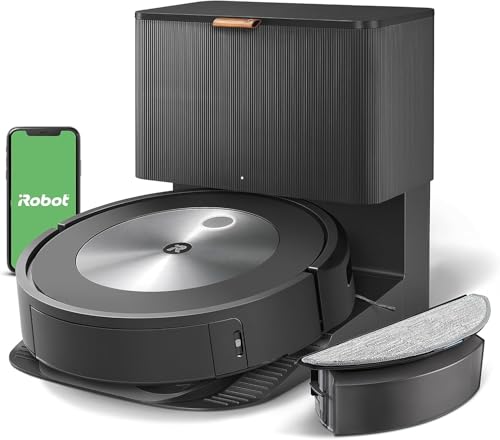
iRobot Roomba Combo j5+ Self-Emptying Robot Vacuum & Mop - Certified Refurbished!
Under $200 Check priceBudget band; Amazon shows the current price - roborock
roborock Q10 S5+ Robot Vacuum and Mop, 10,000Pa Suction
Under $300 Check priceBudget band; Amazon shows the current price - dreame
dreame D30 Ultra CE Robot Vacuum and Mop, 25,000Pa Powerful Suction
Under $500 Check priceBudget band; Amazon shows the current price - roborock
roborock 2026 New Qrevo S Pro Robot Vacuum and Mop, 18,500Pa Suction
Under $500 Check priceBudget band; Amazon shows the current price



Safety
A dry robot vacuum, even one with a mop attachment, is not built to pick up standing water, fireplace ash or drywall dust. Wipe up spills of that kind by hand before letting a robot run through the area.
Common questions
Is a higher Pa number always a better robot vacuum?
Not on its own. Pa measures sealed suction with the inlet blocked, which is a proxy for motor strength, but actual cleaning also depends on the brush roll, wheel design and how well the robot navigates over dirty spots more than once. Compare Pa figures only between robot vacuums, never against an air watts number from a cordless stick vacuum, since the two use different test methods.
Do self-emptying robot vacuums still need a filter changed?
Yes. The self-empty base clears the robot's small onboard bin into a larger bag or bin, but the robot's own filter still needs periodic cleaning or replacement regardless of how the dust is collected afterward. Check the manufacturer's filter schedule for the specific model, since intervals vary by dust load and pet hair.
Can a robot vacuum clean stairs?
No. Every robot vacuum on the market, including every model in this roundup, cleans only the level it is placed on and will not climb or descend stairs. A multi-level home needs either a robot per level or acceptance that upper or lower floors are cleaned by another method.
Will a robot vacuum work on thick carpet?
Robots generally handle low to medium pile carpet reasonably well, since the wheels and brush roll are sized for that range. High-pile carpet over roughly half an inch can bog down the wheels and cause the brush roll to wrap fibers rather than lift them, so check the manufacturer's stated carpet height limit before buying for a home with thick carpet.
What does lidar navigation actually change for the owner?
Lidar uses a laser sensor to measure distances and build a map, and it works identically in a dark room or a bright one, unlike camera-based systems that rely on visible light. In practice this means more consistent room coverage and fewer missed spots in low light, though it does not change how the robot handles cords, thin rugs, or pet waste.
How often does a robot vacuum bin need emptying without a self-empty base?
It depends on floor area and pet hair, but a bin without a self-empty base typically fills after one to three cleaning runs in an average home, faster with shedding pets. Check the binLitres figure on the specific listing; anything under half a litre will need more frequent attention than a model with a one litre or larger bin.
Every figure here comes from published manufacturer specifications, owner reported measurements and repair documentation, and each is labelled as either a standard or a convention. This is researched general information to help you diagnose and plan, not professional advice, and it cannot tell you what is wrong with one particular machine. Your own manual and the part number printed on your machine are the final word.